Skip to content

Ward Management System

Smart WARDOne system for the entire ward

Connect Patient Monitors, Ventilators and Infusion Pumps to your ward management system. Vital signs flow into the system in real time — no handwritten charting.
  • Medical devices connected via IoMT
  • Early warning scores calculated automatically
  • Works on mobile, tablet and desktop
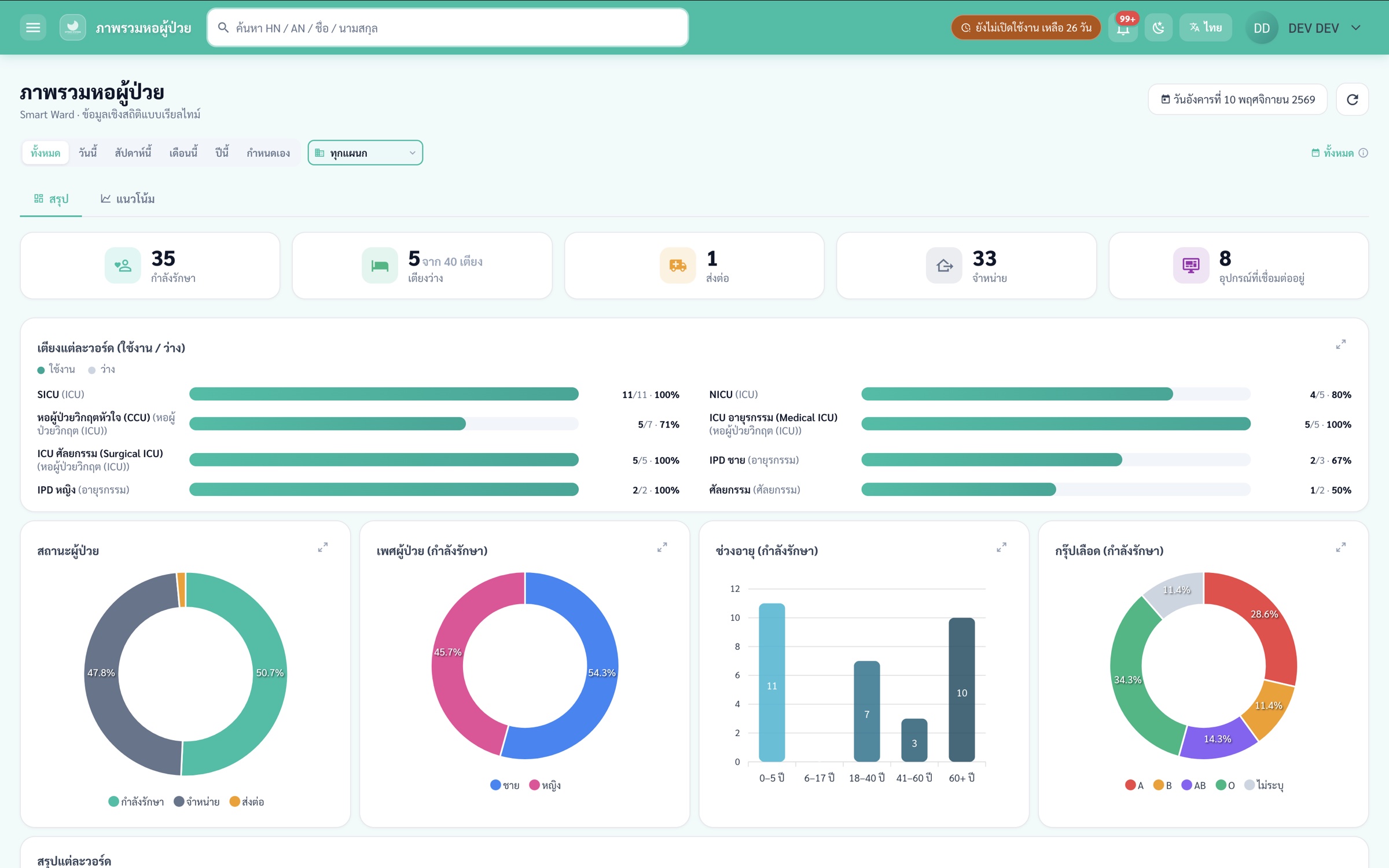
Smart WARD ward overview screen showing patients under treatment, available beds, bed occupancy by ward, and charts of patient status, sex, age group and blood type
Ward overview — screenshot from Smart WARD

About Smart WARD

One system that brings medical devices and ward data together

Smart WARD is a ward management system that combines medical devices, IoMT connectivity and data management in one place.

Doctors and nurses work from a single screen — no juggling multiple vendors.

01

All-in-one

Software together with installation and maintenance services

02

Real-time data

Vital signs are sent from the device straight into the system — no handwritten charting

03

Traceable data

An Audit Trail helps hospitals meet HA / JCI standards

04

Lighter workload for staff

Less paperwork, more time for patient care

Features

8 core capabilities for ward operations

From admitting a patient to a bed, monitoring vital signs and charting, all the way to reports for management.

  • 01

    Patient Management

    HN, personal details and treatment history on one page. Supports department transfers, Discharge, Refer and death records.

  • 02

    Bed Map

    See vacant and occupied beds on the hospital’s actual floor plan, and drag patients onto a bed instantly.

  • 04

    Medical Records

    Progress Note (FDAR) · Nurse Note · Event Note, plus Custom Forms with fields designed by the Admin.

  • 05

    Risk Scores & AI

    Calculated automatically from vital signs and lab results, with AI to help analyze the data.

    • NEWS
    • MEWS
    • EWS
    • APACHE II
    • SOFA
  • 06

    Alerts

    Notify the team immediately when vital signs are abnormal — before the patient deteriorates.

    • Real-time Vital Alert
  • 08

    User Permissions

    Assign Admin · Doctor · Nurse roles, with every action logged with Timestamp / IP.

How It Works

From the bedside to data the team can use right away

How data flows through Smart WARD — from medical devices to medical records and reports.

  1. 1

    Step 01

    Devices send readings to the system

    Patient Monitors, Ventilators and Infusion Pumps send readings into the system automatically, in real time.

  2. 2

    Step 02

    The system calculates early warning scores

    NEWS · MEWS · EWS are calculated from the latest vital signs; APACHE II and SOFA also use lab results.

  3. 3

    Step 03

    The team is alerted to abnormal values

    Alerts fire when vital signs are abnormal or a score reaches a set threshold.

  4. 4

    Step 04

    Record, report and print

    Medical record forms export to PDF, HTML and JPG from data already in the system — no re-entering.

IoMT Integration

Connected medical devices, data entered automatically

Readings from 3 groups of medical devices go straight into the system, reducing manual charting and transcription errors.

  • Patient Monitor

    Parameters received by the system

    • Heart Rate
    • SpO2
    • Blood Pressure
    • Temperature
    • IBP (Invasive Blood Pressure)
    • AG (Anesthetic Gas)
    • Cardiac Output (CO/CI)
    • BIS (Bispectral Index)
  • Ventilator

    Parameters received by the system

    • Mode
    • PEEP
    • Tidal Volume
    • FiO₂
    • Peak Pressure
    • Respiratory Rate
    • Minute Volume
    • PIP
  • Infusion Pump

    Parameters received by the system

    • Flow Rate
    • Drug Library
    • VTBI (Volume to be Infused)
    • Status
    • Bolus / Purge Rate
    • KVO (Keep Vein Open)
    • Occlusion Pressure
    • Air Bubble Detection

Product Tour

Smart WARD in action

A closer look at each module, with screenshots from the system.

01 / 07

Patient Management

Follow each patient from admission to discharge, with their data carried through every step.

  • Transfer patients between departments / wards / rooms in one system — their data follows instantly
  • Discharge records the date, time and the staff member responsible
  • Refer records complete details without re-entering them
  • End-to-end recording of deaths, covering every case
  • Kanban-style status board — a card per bed with level of care, drug allergies and underlying conditions
  • Custom Intake Forms by ward and age group
  • Less paperwork
  • No lost data
  • Full history at hand
Status board — Screenshot from Smart WARD (Thai interface)
02 / 07

Bed Map

See the whole ward on one map, and admit patients to a bed from the same screen.

  • Real-time bed status — vacant / occupied — on the actual ward layout
  • Admit a patient to a bed with a click on the map, without switching screens
  • Upload your ward layout using the hospital’s real floor plan
Bed map view — Screenshot from Smart WARD (Thai interface)
03 / 07

Vital Signs & Medical Devices (IoMT)

Readings from bedside devices appear on the patient page without manual charting.

  • View data per device: Patient Monitor, Ventilator and Infusion Pump
  • Infusion Pump volumes are added to Intake in the intake–output record
  • Log of medical device connections to the system
  • The BME team can see connection status and the data source for each device
Patient Monitor — Screenshot from Smart WARD (Thai interface)
04 / 07

Alerts

The team knows immediately when a patient has abnormal values, so they can act before the patient deteriorates.

  • Real-time Vital Alert when vital signs are abnormal
  • Alerts when an early warning score reaches a set threshold
  • Nurses see beds and alarms on one screen
  • History of abnormal-value alerts for each patient
Alert history — Screenshot from Smart WARD (Thai interface)
05 / 07

Risk Scores & AI

Early warning scores are calculated automatically, and AI helps summarize assessments.

  • NEWS · MEWS · EWS calculated automatically from the latest vital signs
  • APACHE II and SOFA with the related lab results
  • AI helps analyze, process and summarize assessment results instantly
  • Alerts when a score reaches a set threshold, and results can be attached to notes
  • NEWS
  • MEWS
  • EWS
  • APACHE II
  • SOFA
AI assistant for Progress Note / Nurse Note — Screenshot from Smart WARD (Thai interface)
06 / 07

Medical Records

One form at the bedside — the system calculates totals and fills the charting tables automatically.

  • Color bands show the risk level instantly as you pick a score, reducing misinterpretation
  • Intake: Oral · Parenteral · Blood and volumes from the Infusion Pump
  • Output: Urine · Emesis · Drainage · Aspiration · Blood Loss
  • Record Stools / Urine counts and remarks with ready-made phrases
  • Medical record forms print instantly and export to PDF, HTML and JPG — no re-entering

Scores that can be recorded

Pain
0 – 10
Sedation
0 – 4
Fall
0 – 5
Coma (GCS)
E · V · M
Braden
6 – 23
Daily
Weight · Height · Diet
  • Vital signs chart
  • Nursing Care Sheet
  • Intake & Output
  • Progress Note
  • Nurse Note
  • Event Note
Score & I/O record — Screenshot from Smart WARD (Thai interface)
07 / 07

Dashboard & Statistical Reports

Data for management — overviews, trends and exportable reports.

  • Ward overview — admissions, discharges, referrals, bed occupancy and available beds by ward
  • Trends — admissions, discharges, referrals, bed occupancy and mortality rate by ward
  • Patient statistics by level of care
  • Export statistical reports for management
Ward trends — Screenshot from Smart WARD (Thai interface)

Who It Is For

Designed for every role in the hospital

Each team sees the data it needs, from the same system.

Nursing

Nurses

Less paperwork, more time for patient care.

  • Faster shift charting
  • Less duplicate writing
  • Beds and alarms on one screen

Physicians

Doctors

Review vital sign trends, severity scores and Progress Notes.

Management

Executives

Dashboards for bed occupancy, admissions–discharges and statistical reports.

IT

IT Team

Manage users, API permissions and a tamper-proof Audit Trail.

Biomedical Engineering

BME Team

See device connection status and the data source for each device.

Devices

Works on every device, at every point of care

Choose the right device for the job — from the bedside to the nurses’ station.
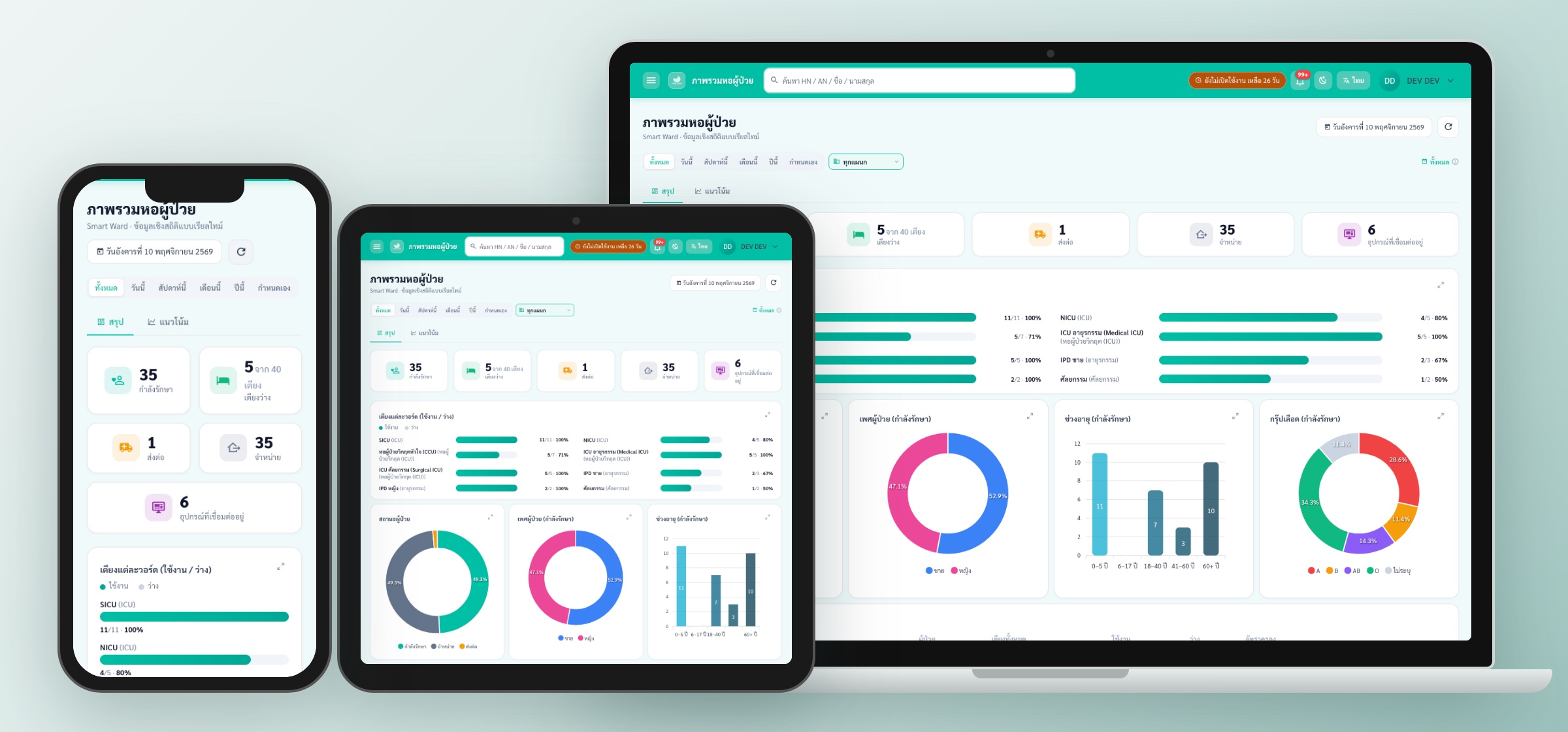
Smart WARD ward overview on a phone, tablet and laptop, with the layout adapting to each screen size
Smart WARD on phone, tablet and desktop
  • Mobile

    Portable — use it at the patient’s bedside

    01
  • Tablet

    A bigger screen, ideal for ward rounds

    02
  • Desktop

    Full management from the nurses’ station

    03

Contact

Interested in Smart WARD for your ward?

Contact our team to learn more about the system.

Websitewww.ottimosystems.co.thEmailottimo.system@gmail.comPhone+66 2 183 9100Mobile096-095-4594